If you’ve used an AI coding assistant like GitHub Copilot, Claude Code, or Cursor, you’ve probably experienced the same cycle.
You write a prompt. The AI generates code that compiles and looks reasonable. But it isn’t quite right.
So you refine the prompt.
Then you refine it again.
And again.
Before long, you’re spending more time correcting the AI than you expected.
Most developers interpret this as evidence that AI coding tools aren’t reliable. In reality, the problem is usually much simpler: the AI is working with incomplete information.
You gave it a task, but not the context that makes your system unique.
Your architecture decisions.
Your coding standards.
Your security requirements.
Your business constraints.
Your team’s conventions.
Those details are exactly what determine whether AI-generated code fits naturally into your codebase or fights against it.
The solution isn’t better prompt engineering.
The solution is giving the AI a proper brief before it writes a single line of code.
That’s the problem GitHub Spec Kit was designed to solve.
What Is GitHub Spec Kit?
GitHub Spec Kit is a free, open-source toolkit that introduces a specification-first workflow for AI-assisted software development.
Instead of repeatedly feeding context into prompts, Spec Kit creates a structured, persistent source of truth that both humans and AI can reference throughout a project’s lifecycle.
At the center of the approach is a .specify/ folder stored directly in your repository.
Think of it as the long-term memory of your project.
Every AI interaction reads from it.
Every important decision is documented in it.
The Four Core Files
1. Constitution.md
This file contains your project’s non-negotiable rules:
- Technology stack
- Architectural constraints
- Security requirements
- Testing standards
- Naming conventions
- Coding guidelines
Before generating code, the AI reads these rules and aligns its output accordingly.
2. Spec.md
This defines the feature you’re currently building.
A good specification typically includes:
- Problem statement
- User stories
- Acceptance criteria
- Scope boundaries
The value of writing a spec isn’t the document itself — it’s the process of resolving ambiguity before implementation begins.
3. Plan.md
Once the AI understands both the constitution and the specification, it generates a technical implementation plan.
Because the plan is based on documented standards, it aligns with your architecture instead of suggesting generic solutions.
4. Tasks.md
The implementation plan is then broken into small, atomic tasks.
Each task is specific enough for an AI coding agent to complete in a focused pass without guessing what “done” means.
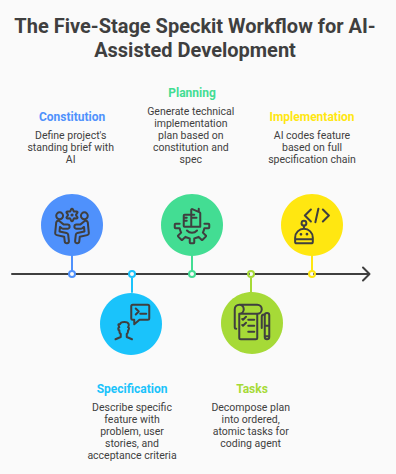
The Five-Stage Workflow
Spec Kit revolves around five slash commands that build on one another.
/speckit.constitution
You and the AI collaborate to create your project’s constitution.
For existing systems, this captures decisions that have already been made.
For new projects, it forces important architectural conversations before code exists.
/speckit.specify
Define the feature you’re building.
The framework guides you through:
- Problem definition
- User stories
- Acceptance criteria
- Scope limits
The goal isn’t length.
The goal is clarity.
/speckit.plan
The AI reads the constitution and specification, then generates a technical implementation plan.
Because the plan is grounded in your project’s documented standards, it’s far more relevant than a generic AI response.
/speckit.tasks
The implementation plan is decomposed into an ordered list of executable tasks.
Each task has a clear objective and completion criteria.
/speckit.implement
Finally, the coding agent executes the task list while maintaining access to the complete specification chain.
Instead of guessing your intent, it builds against a documented brief.
Optional Commands Worth Using
/speckit.clarify
Identifies gaps, ambiguities, and underspecified requirements before planning begins.
/speckit.analyze
Cross-checks the specification, plan, and tasks for contradictions, missing details, and implementation risks.
Where Spec Kit Makes the Biggest Difference
Starting a New Project
When starting from scratch, most teams prioritize speed.
That’s reasonable for a prototype.
But once multiple developers — or multiple AI sessions — begin making independent architectural decisions, inconsistencies appear quickly.
A constitution created on day one eliminates many of those inconsistencies before they can accumulate.
The result isn’t necessarily more code.
It’s more coherent code.
Adding Features to Existing Systems
Legacy and mature codebases contain countless constraints that AI assistants cannot infer:
- Internal architectural patterns
- Team conventions
- Historical decisions
- Dependency limitations
The common workaround is repeatedly pasting context into prompts.
That approach is tedious and eventually hits context-window limits.
Spec Kit solves this by encoding those constraints once and making them available to every future AI interaction.
Generated code is far more likely to fit into the existing system and far less likely to create review friction.
Working Across Teams
Without a shared specification process, every developer using AI receives slightly different interpretations of how work should be implemented.
Over time, those differences compound.
The codebase becomes less cohesive.
Because the .specify/ directory is version-controlled, everyone works from the same source of truth.
Changes become visible, reviewable, and documented through pull requests.
Limitations to Keep in Mind
Spec Kit isn’t magic.
A vague specification still produces vague results.
If a team cannot clearly articulate what it’s building and why, the framework will expose that problem rather than solve it.
Likewise, creating a strong constitution requires upfront effort.
Teams that haven’t formally documented architectural decisions should expect some initial discussion and alignment work.
And for quick experiments, prototypes, or throwaway scripts, the full workflow may introduce more overhead than value.
Spec Kit shines when:
- The project is complex
- Work spans multiple days or weeks
- Multiple people are involved
- Long-term maintainability matters
How to Get Started
Don’t attempt a company-wide rollout immediately.
Instead, choose a single feature with:
- Meaningful complexity
- Clearly defined scope
- Real business value
Run the complete five-stage workflow from start to finish.
One successful example will demonstrate the benefits more effectively than any documentation or presentation ever could.
The Real Takeaway
AI coding tools are genuinely useful.
But their usefulness is directly proportional to the quality of context they receive.
Today, most developers provide far less context than their AI assistants actually need, then spend hours cleaning up the consequences.
GitHub Spec Kit offers a practical way to close that gap.
You document your requirements once, store them in a structured format, and make them available to every future AI interaction.
The result is code that is more consistent, more maintainable, and far more aligned with your intentions.
The shift isn’t primarily technical.
It’s behavioral.
Write the brief first. Then build.
If you’ve been frustrated by AI-generated code that consistently misses the mark, that habit change may be the highest-leverage improvement you can make.
The AI is only as good as the context you give it. Give it a proper specification, and you may be surprised by how much better it performs.